In January 2026 alone, phishing attacks drained more than $311 million from crypto users. One single social engineering incident accounted for $284 million of that total. Signature phishing losses jumped 207% from December to January.
Phishing is no longer a minor nuisance in crypto. It is the single most dangerous threat individual holders face — more damaging than exchange hacks, smart contract bugs, or any technical exploit. And unlike most technical attacks, phishing targets something that can’t be patched: human behavior.
Understanding how these attacks work is the most effective defense available.
What Is Phishing in Crypto?
In traditional security, phishing means tricking someone into revealing their credentials — usually a username and password — by impersonating a trusted entity.
In crypto, phishing means the same deception, but the stakes are different and the methods have evolved significantly. Crypto attackers don’t need your password. They don’t need to hack any server. They just need you to approve one transaction — and the results can be instantaneous and permanent.
The core insight: Phishing works because crypto transactions are final. Attackers don’t need to break cryptography. They need a human to approve something. Modern crypto phishing focuses on approvals and signatures — not passwords — because that’s the most direct path to funds.
The 8 Types of Crypto Phishing Attacks
1. Fake Websites (Clone Phishing)
The most common form. Attackers create near-perfect replicas of:
- Crypto exchanges (Coinbase, Binance, Kraken)
- Wallet interfaces (MetaMask, Phantom, Ledger Live)
- DeFi protocols (Uniswap, Aave, OpenSea)
- NFT marketplaces and mint pages
The fake site is visually identical to the real one. The domain name differs by one character — a homoglyph (a character that looks identical but is different), a different TLD (.io vs .com), or a hyphen. You enter your seed phrase or private key on the fake site, and the attacker instantly drains your wallet.
How victims arrive: Google ads (attackers pay to rank above legitimate sites), DM links, compromised Discord/Telegram channels, social media posts with wrong links.
Real example: In 2024, a fake WalletConnect scheme targeted users through emails claiming “account issues” — the links led to phishing pages that harvested seed phrases.
Protection: Bookmark every official URL you use. Never follow links from emails, DMs, or social media to crypto services. Check the URL character by character before entering any information.
2. Email Phishing
The classic form, still extremely effective. You receive an email appearing to come from Coinbase, MetaMask, Ledger, or another service you use. The message creates urgency:
- “Your account has been compromised — verify immediately”
- “Unusual activity detected — click here to secure your account”
- “Your wallet has been suspended — complete KYC to restore access”
- “Important security update required”
The link in the email goes to a fake website. Your login credentials or seed phrase go to the attacker.
Why it still works: Attackers harvest email addresses from data breaches and dark web databases. The 2020 Ledger database breach exposed 1+ million customer emails — those addresses have been targeted by fake Ledger emails ever since.
Protection: Never click links in emails about your crypto accounts. Instead, open a new browser tab and navigate directly to the official URL from your bookmarks. Real crypto services never ask you to verify credentials by clicking an email link.
3. Wallet Drainers (The Technical Evolution)
Wallet drainers represent the most technically sophisticated evolution of crypto phishing. They don’t steal your password or seed phrase — they trick you into approving a malicious transaction that gives the attacker permission to take your funds.
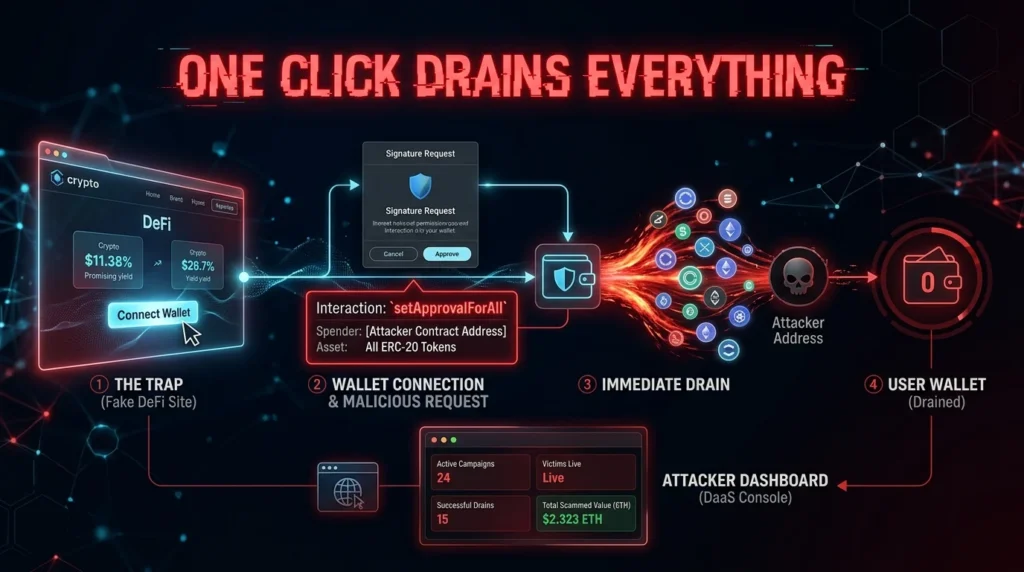
How drainers work:
- You arrive at a fake site (NFT mint, airdrop claim, DeFi protocol)
- The site asks you to “connect your wallet” — which appears normal
- Once connected, a transaction request appears: “Sign to verify ownership” or “Approve to claim tokens”
- The transaction you’re approving is actually a malicious
setApprovalForAllorpermitcall - You click approve, believing it’s harmless
- The drainer script instantly empties your wallet of all tokens matching the approval
The theft takes seconds. The victim often doesn’t realize what happened until they check their wallet later.
Drainers-as-a-Service (DaaS): Wallet drainer tools are now rented on the dark web like legitimate SaaS products — complete with dashboards, customization options, and “customer support.” In early 2026, Safe Labs uncovered a coordinated campaign involving 5,000 malicious addresses linked to wallet drainer tools. Non-technical criminals can now execute sophisticated attacks with no coding knowledge.
Protection: Use Rabby Wallet (simulates transactions before signing). Use Revoke.cash regularly to review and revoke token approvals. A hardware wallet displays transaction details on the device screen — if the on-screen details don’t match what the site described, don’t sign.
4. Ice Phishing (Approval-Based Attacks)
Ice phishing is a specific variant where you’re tricked into authorizing the attacker to control your assets — without the attacker ever touching your private key.
Unlike traditional phishing that steals credentials, ice phishing manipulates you into signing a legitimate-looking transaction that grants an attacker permission to transfer your tokens.
The most dangerous approval calls:
approve()— grants permission to spend a specific amount of a specific tokensetApprovalForAll()— grants permission to transfer ALL tokens (and NFTs) in a collectionpermit()— a gasless approval that can be signed off-chain and submitted later
The attack is “legitimate” in the sense that you signed it. The blockchain doesn’t know the difference between a transaction you intended and one you were tricked into signing.
Real example: NFT collectors have lost entire collections worth hundreds of thousands of dollars after clicking “approve” on what appeared to be an NFT marketplace interaction. One setApprovalForAll signature — and everything is gone.
Protection: Read every approval request carefully. Use Rabby Wallet’s transaction simulation. If you see setApprovalForAll requested by an unfamiliar contract, reject it. Regularly audit your approvals at Revoke.cash.
5. Fake Support Agents
You post a question about a wallet issue in Discord, Telegram, Reddit, or Twitter. Within minutes — sometimes seconds — “official support” DMs you.
The fake support agent:
- Has a username nearly identical to a real project (MetaMask_Support vs MetaMask Support)
- Is warm, professional, and helpful
- Eventually asks you to visit a “support portal,” “wallet sync page,” or “verification tool”
- The destination asks for your seed phrase to “restore” or “verify” your wallet
Or they ask you directly in the DM: “Can you share your seed phrase so we can investigate the issue?”
The absolute rule: No legitimate crypto project, exchange, wallet, or DeFi protocol will ever ask for your seed phrase through any channel — DM, email, official form, or anywhere else.
6. Clipboard Hijacking
This attack doesn’t require any interaction beyond installing malware on your device.
Malware monitors your clipboard. When you copy a crypto wallet address (to receive a payment or send funds), the malware silently replaces it with the attacker’s address. The switch is nearly invisible — sophisticated versions match the first and last few characters of the original address, making quick glances miss the substitution.
You paste the address, send your crypto — and it goes directly to the attacker.
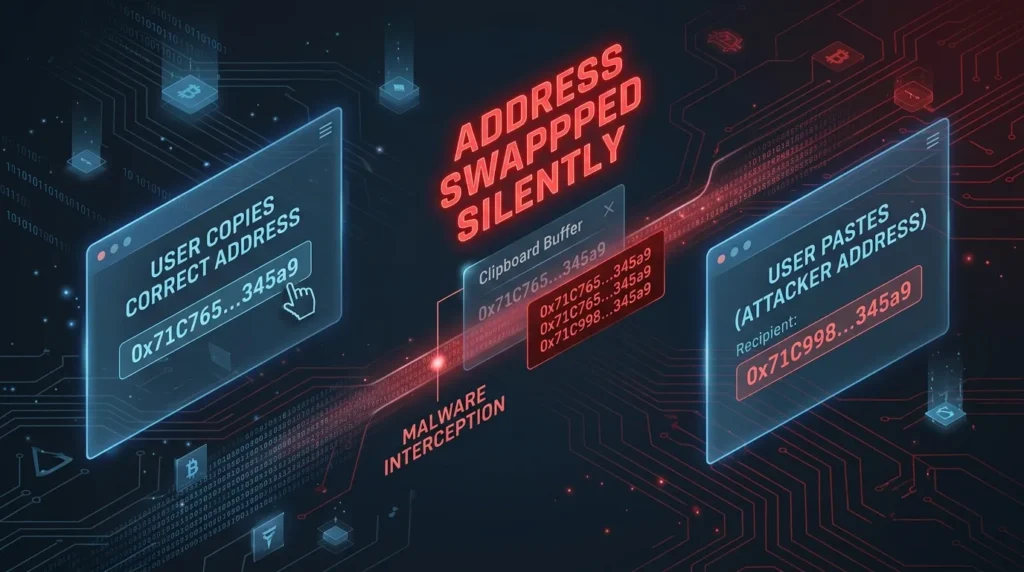
Why it’s insidious: The victim believes they sent to the right address. They may not discover the theft immediately. The malware operates completely silently.
Protection: Always verify the complete wallet address after pasting — especially the first and last 6–8 characters. For large transactions, verify character by character or copy-paste in stages. A hardware wallet solves this problem definitively — it shows the final destination address on the device screen, independent of your computer’s state.
7. Malicious Browser Extensions
Browser extensions have broad access to webpage content — they can read what you type, modify what you see, and intercept what you submit.
Malicious crypto extensions disguise themselves as:
- Legitimate wallet extensions (fake MetaMask, fake Phantom)
- “Gas fee savers” or “DeFi yield optimizers”
- NFT rarity checkers or portfolio trackers
- Price alert tools
Once installed, they can inject malicious code into DeFi protocol pages, alter transaction details in real time, harvest seed phrases typed into web wallets, and redirect approvals to attacker-controlled contracts.
In early 2026, Safe Labs uncovered a coordinated campaign where malicious extensions were specifically designed to target users of hardware wallets during the signing process.
Protection: Install browser extensions only from official sources. Regularly audit your installed extensions — remove anything you don’t actively use. Never install extensions recommended by strangers in DMs or Discord.
8. Physical Mail Phishing (2026 Trend)
Perhaps the most surprising development of 2026: physical letters.
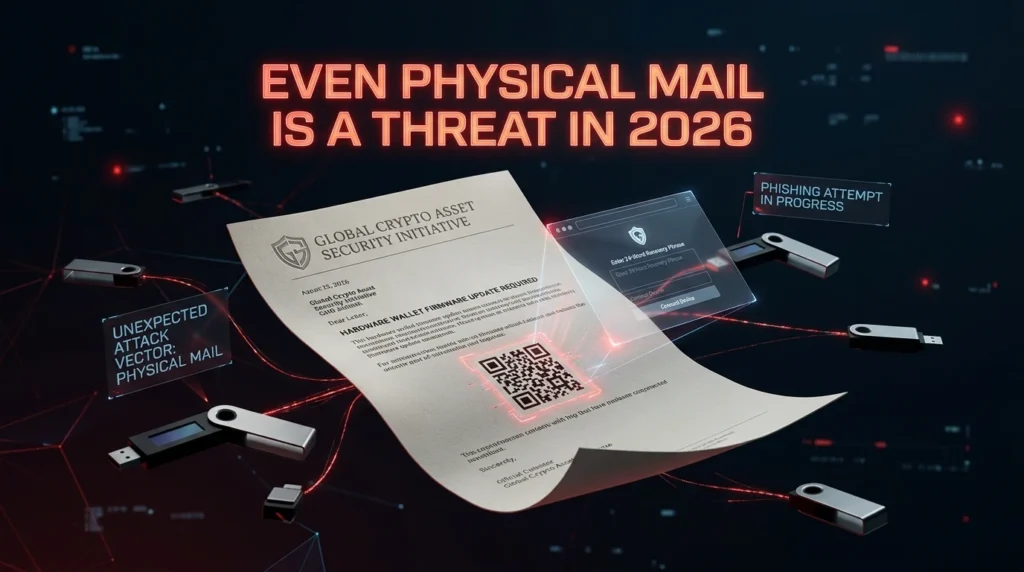
After data breaches exposed the physical addresses of hardware wallet buyers, attackers began sending official-looking letters impersonating Ledger and Trezor. These letters:
- Are printed on convincing branded letterhead
- Claim the recipient must complete a “mandatory security update” or “device authentication”
- Include a QR code linking to a fake setup website
- The fake site asks for the seed phrase to “re-sync” the device
The physical mail format is effective precisely because it’s unexpected — victims are trained to be skeptical of emails and DMs, but a letter feels more official.
Protection: Ledger and Trezor will never send you a letter requiring you to enter your seed phrase anywhere. The only time your seed phrase is used is to restore a wallet on a new device — using the official manufacturer’s app, downloaded from the official website.
The Phishing Attack Lifecycle
Understanding how attacks are deployed helps you recognize them before engaging:
Step 1 — Bait: A clone of a popular site, an “exclusive airdrop,” a fake NFT mint, a fake “limited whitelist,” or a compromised social media account posting a malicious link.
Step 2 — Traffic: Google ads (attackers pay for search placement), mass DM campaigns, bots posting in Discord/Telegram, email campaigns to breached addresses.
Step 3 — Wallet connection: The phishing page asks you to “connect wallet” or “sign to verify” — which appears to be standard Web3 interaction.
Step 4 — Theft: Your approval of the malicious transaction triggers the drainer. Funds are moved to attacker-controlled addresses, split across multiple wallets, and often bridge-hopped across chains within minutes.
Step 5 — Laundering: Stolen funds pass through mixers, DEX swaps, and cross-chain bridges to obscure the trail. Recovery becomes extremely difficult within hours.
How to Protect Yourself: The Complete Defense
Verify URLs obsessively. Every crypto service you use should be bookmarked. Before entering any information or connecting a wallet, read the URL character by character. Attackers use lookalike domains — coḃo.com with a special character, metamask-wallet.io instead of metamask.io — that are visually identical to the real domain.
Use a hardware wallet. Hardware wallets display transaction details on their physical screen — independent of your computer’s state. Even if your computer is fully compromised, you see the real destination address on the Ledger or Trezor screen before signing. Clipboard hijacking and malicious extension attacks become ineffective.
Use Rabby Wallet for DeFi. Rabby simulates every transaction and shows you exactly what will happen before you sign — what tokens will move, what permissions will be granted, what contracts are involved. This is the best tool for preventing accidental drainer approvals.
Audit approvals with Revoke.cash. Regularly check what approvals you’ve granted to smart contracts. Remove any you no longer need. An old setApprovalForAll from a defunct NFT project is an open door if that contract is later exploited.
Remove unused browser extensions. One malicious extension can compromise everything. Keep your browser extension list minimal and verified.
Never enter your seed phrase on any website. Ever. Under any circumstances. For any reason. If a website asks for your seed phrase, it is a phishing attack — full stop.
Separate your wallets by risk. A dedicated “hot” wallet for DeFi exploration with small amounts. A hardware wallet for significant holdings that you connect to new protocols sparingly.
Key Terminology
Phishing: Deception attack that tricks users into revealing credentials or approving malicious transactions by impersonating legitimate services.
Wallet Drainer: Malicious script that uses approved permissions to instantly sweep all assets from a connected wallet.
Ice Phishing: Phishing variant that manipulates users into approving transactions giving attackers control over their assets — without stealing private keys.
Drainers-as-a-Service (DaaS): Dark web service model where wallet drainer tools are rented to criminals with no technical skills.
setApprovalForAll: Smart contract function granting unlimited permission to transfer all tokens/NFTs in a collection — frequently abused in drainer attacks.
Clipboard Hijacking: Malware that silently replaces wallet addresses in clipboard with attacker-controlled addresses.
Homoglyph Attack: Using visually identical but technically different characters in domain names to create convincing fake URLs.
Revoke.cash: Tool for reviewing and revoking token approvals granted to smart contracts.
The Bottom Line
Crypto phishing in 2026 is highly targeted, AI-enhanced, and increasingly sophisticated. But most attacks still rely on the same fundamental mechanic: getting you to approve something you shouldn’t.
The defenses are not complicated:
- Verify every URL before connecting
- Read every transaction approval before signing
- Use Rabby Wallet for DeFi, Revoke.cash for audits, hardware wallet for storage
- Your seed phrase never goes on a website — not even a convincing one
In crypto, moving carefully is more valuable than moving quickly. Slowing down to verify costs seconds. Getting drained costs everything. 🎣🛡️
Disclaimer: This article is for informational purposes only and does not constitute financial advice. Cryptocurrency investments carry significant risk, including the potential loss of all invested capital. Always conduct your own research before making any investment decisions.