Your password was probably stolen.
That’s not a dramatic exaggeration. Billions of usernames and passwords are available on the dark web right now, harvested from thousands of data breaches at companies you’ve used over the years. If you’ve had the same email address for more than five years, there’s a high probability your credentials appear in at least one breach.
For most online accounts, a stolen password is annoying. For a crypto exchange account, it’s potentially catastrophic.
Two-factor authentication (2FA) is the single most effective thing you can add to your crypto security after a strong password. Understanding how it works — and which method to use — makes the difference between security that actually holds and security that creates a false sense of safety.
What Is Two-Factor Authentication?
Two-factor authentication (2FA) — also called two-step verification or MFA (multi-factor authentication) — requires you to prove your identity using two separate pieces of evidence before granting account access.
The three categories of authentication evidence:
- Something you know — a password, PIN, answer to a security question
- Something you have — a phone with an authenticator app, a physical security key, a SIM card
- Something you are — fingerprint, face scan, biometric data
A single password is “something you know” — one factor. If stolen, it’s the only barrier between an attacker and your account.
2FA combines two factors — typically “something you know” (password) + “something you have” (authenticator app code or hardware key). Even if an attacker steals your password, they still can’t access your account without the second factor which only you possess.
Why this matters for crypto specifically: Unlike a bank, a crypto exchange has no fraud department to call, no chargeback process, no account recovery by “proving your identity to customer support.” If an attacker gets in, they drain your account in seconds and it’s permanent. 2FA is not optional security — it’s the minimum standard.
Why Passwords Alone Are Not Enough
Data breaches: Every major data breach exposes usernames and passwords. LinkedIn, Adobe, Dropbox, Yahoo, and thousands of other companies have experienced breaches exposing billions of credentials. Password reuse — using the same password across multiple sites — turns one breach into a master key.
Phishing: Fake websites collect your real password when you type it. The attacker gets your correct credentials without any technical hacking.
Credential stuffing: Attackers take breached username/password combinations and automatically try them across hundreds of services. If you use the same password on a forum and your crypto exchange, one forum breach compromises your exchange account.
Keyloggers: Malware that records every keystroke — including the password you type — is surprisingly common.
The pattern: your password can be compromised without you knowing, through no fault of your own, from a completely unrelated service.
2FA breaks this attack chain. Even with your correct password, the attacker can’t get in without your second factor.
The 4 Types of 2FA: From Weakest to Strongest
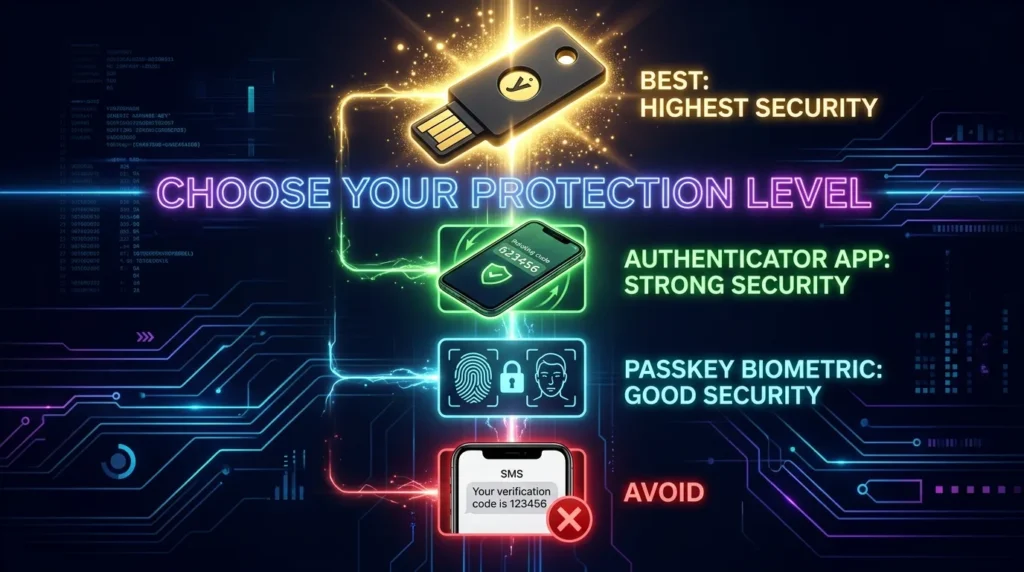
Type 1: SMS / Text Message 2FA — ❌ Avoid for Crypto
A code is sent to your phone number via text message. You enter it after your password.
Why it’s dangerous:
SIM Swap attacks: Criminals call your phone carrier, impersonate you using personal information gathered from social media or data breaches, and convince the carrier to transfer your phone number to a SIM card they control. From that moment, all SMS messages — including your 2FA codes — go to the attacker. This attack doesn’t require hacking anything technical.
The carrier employee is the vulnerability. The GSM phone system itself has fundamental design weaknesses. Some SMS vulnerabilities are unpatchable — they exist in the core protocol.
Real impact: High-profile SIM swap attacks have drained crypto accounts worth millions. The FBI regularly reports SIM swap losses. In 2023, SIM swap victims in the US lost over $68 million to cryptocurrency theft.
The verdict: SMS 2FA is better than no 2FA. But for crypto accounts, it’s dangerously weak. Disable it and use an authenticator app.
Type 2: Email 2FA — ❌ Avoid
A code sent to your email address. Subject to email compromise, phishing, and all the same problems as passwords. Not recommended for crypto security.
Type 3: Authenticator Apps (TOTP) — ✅ Recommended for Most Users
Apps like Google Authenticator, Authy, or Microsoft Authenticator generate Time-Based One-Time Passwords (TOTP) — 6-digit codes that change every 30 seconds.
How TOTP works:
- When setting up 2FA, you scan a QR code (or enter a secret key) from the exchange
- This creates a shared secret between the exchange and your app
- Both the app and the exchange independently calculate the same 6-digit code based on the shared secret + current timestamp
- You enter the 6-digit code shown in your app when logging in
- The exchange verifies it matches what they calculated
- The code expires in 30 seconds — useless to an attacker who intercepts it
The critical security advantage: Codes are generated on your device, never transmitted over a network. SIM swap attacks are completely irrelevant — there’s no SMS to intercept.
Important limitation: TOTP codes can still be phished in real-time. If you enter your password and a TOTP code on a fake website, a sophisticated attacker can relay both credentials to the real exchange within the 30-second window. This is rare but possible and is why hardware keys are superior for high-value accounts.
Setup guide:
- Download Google Authenticator or Authy from the official app store
- In your exchange account → Security → 2FA → Enable Authenticator App
- Scan the displayed QR code with your authenticator app
- Write down the backup/recovery code provided — store it physically offline, not digitally
- Enter the 6-digit code shown in the app to confirm setup
Authy vs Google Authenticator:
- Google Authenticator: Simple, widely supported, codes stored locally on your device only
- Authy: Supports multi-device sync and encrypted cloud backup (useful if you lose your phone), but introduces cloud dependency
Type 4: Hardware Security Keys (FIDO2/U2F) — ✅✅ Best for Significant Holdings
Physical devices — most commonly YubiKey — that you plug into USB or tap via NFC to authenticate.
How they work:
- During login, after entering your password, the exchange asks you to insert and tap/press your YubiKey
- The YubiKey performs cryptographic authentication directly with the exchange’s server
- It verifies the actual domain it’s authenticating to — not just a code
Why hardware keys are superior:
Phishing-immune: The YubiKey communicates directly with the service’s actual domain using public-key cryptography. If you’re on a fake phishing site, the YubiKey simply won’t authenticate to the fraudulent domain — regardless of how convincing the site looks. This is the critical advantage over TOTP apps.
No battery, no network required: Works entirely offline. No app, no phone signal, no cloud dependency.
Physical possession required: Even with your correct password and the exchange’s domain, an attacker needs your physical YubiKey. Remote attacks are impossible.
The limitation: Cost ($45–$70 per key), and not all exchanges support hardware keys yet. Coinbase and Kraken support YubiKey; support is expanding across major platforms.
Recommendation: Anyone with $10,000+ in crypto on exchanges should seriously consider a YubiKey. Register at least two (primary + backup stored separately).
Where to Enable 2FA: The Priority List
Absolutely essential:
- Every crypto exchange account (Coinbase, Kraken, Bybit, Binance)
- Your email account — especially the one linked to crypto services
- Any password manager containing crypto-related passwords
Highly recommended:
- Social media accounts (attackers use these for account recovery chains)
- Cloud storage services
- VPN services
The critical order: Secure your email first. Most password reset flows go through email. If your email is compromised, an attacker can reset your exchange password regardless of 2FA on the exchange. Email security is the root of everything else.
The SIM Swap Attack: How It Works in Detail
SIM swapping deserves detailed explanation because it’s so specifically dangerous for crypto holders and so misunderstood.
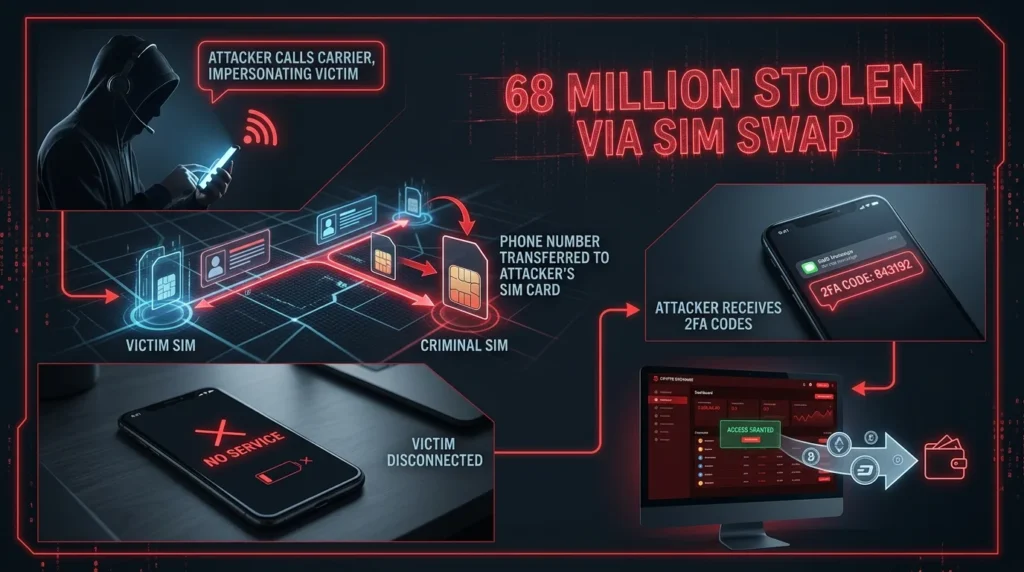
The attack flow:
- Reconnaissance: Attacker researches the target — name, email, phone number, last four of SSN (often from data breaches), carrier (guessable from publicly available information).
- Social engineering the carrier: Attacker calls the phone carrier. Poses as the victim. Claims they “lost their phone” or are “switching devices.” Provides enough personal information to pass verification. Convinces the carrier to transfer the phone number to a new SIM.
- Number transfer: Phone number is now on the attacker’s SIM. Victim’s phone loses service — they may not notice immediately.
- Account takeover: Attacker initiates “forgot password” on the target’s email or exchange. Password reset code goes to the attacker’s phone (now with victim’s number). Attacker resets the password. 2FA codes (if SMS) also go to the attacker. Account is fully compromised.
- Rapid draining: Crypto is transferred within minutes. By the time the victim notices their phone has no service, funds are gone.
The fix: Move all crypto-related accounts to authenticator app 2FA or hardware keys. Remove SMS 2FA. An attacker with your phone number cannot intercept TOTP codes — they’re generated locally on your device.
Backup Codes: The Most Important Step Everyone Skips
When you set up authenticator app 2FA on any exchange, the exchange provides backup codes — a set of one-time-use codes that can restore access if you lose your phone.
These are critical. If your phone is lost, stolen, or broken without backup codes, you may be permanently locked out of your exchange account.
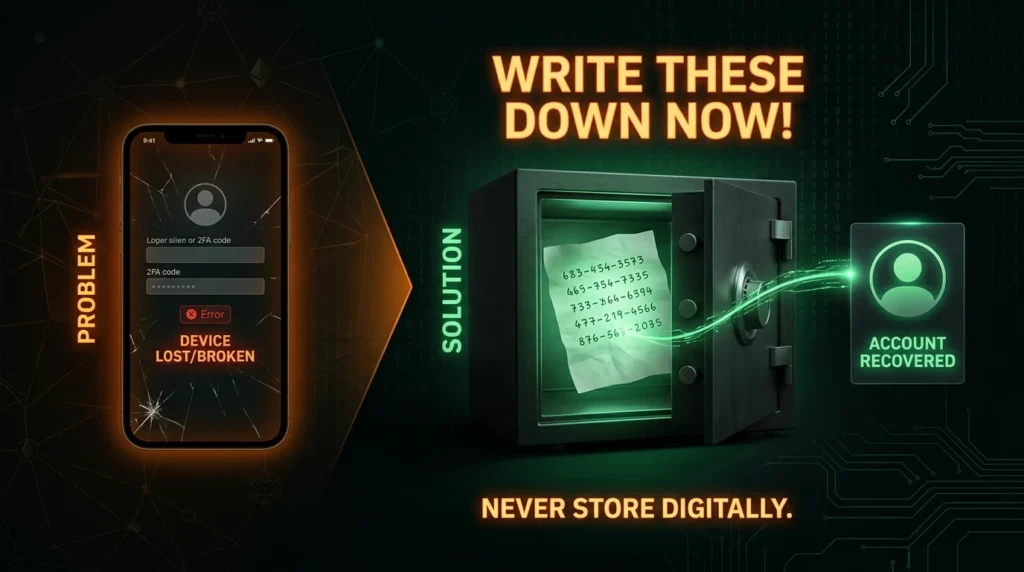
How to handle backup codes:
- Write them down immediately when generated
- Store them physically — in a safe, a safety deposit box, with other important documents
- Never store them digitally or in cloud storage
- Never photograph them (photos sync to cloud automatically on most phones)
- Consider making two physical copies stored in separate locations
Common 2FA Mistakes
Using SMS 2FA for crypto accounts. The most common mistake. Replace it with an authenticator app immediately.
Storing backup codes in a photo on your phone. Photos sync to iCloud/Google Photos. A breached cloud account exposes them.
Only having one 2FA device with no backup. If you lose your phone with Google Authenticator and have no backup codes, you’re locked out.
Ignoring 2FA on your email. Securing the exchange but not the email that can reset exchange access.
Thinking 2FA makes you fully phishing-proof. TOTP codes can be relayed in real-time by sophisticated attackers. Habit of verifying URLs remains essential.
Key Terminology
2FA (Two-Factor Authentication): Security requiring two forms of identity proof — typically password + authenticator code.
TOTP (Time-Based One-Time Password): 6-digit rotating codes generated by authenticator apps based on a shared secret and current timestamp, changing every 30 seconds.
SIM Swap: Attack where criminals convince phone carriers to transfer a victim’s number to their SIM — enabling interception of SMS 2FA codes.
FIDO2/U2F: Security standards that hardware keys like YubiKey implement — enables phishing-resistant cryptographic authentication.
YubiKey: The most common hardware security key — a physical USB/NFC device that provides the highest level of 2FA security.
Backup Codes: One-time-use codes provided when setting up 2FA that allow account recovery if primary 2FA device is lost.
MFA (Multi-Factor Authentication): Authentication using three or more factors — something you know, have, and are.
The Bottom Line
2FA is not optional for crypto. Your exchange accounts hold real money with no fraud protection. If an attacker gets in, the damage is permanent.
What to do right now:
- Enable authenticator app 2FA (Google Authenticator or Authy) on every crypto exchange account
- Enable 2FA on your crypto-linked email account
- Write down backup codes — store them physically offline
- Disable SMS 2FA wherever you find it on crypto accounts
- For significant holdings: consider a YubiKey hardware key
The setup takes 30 minutes. The protection it provides is substantial. There’s no reasonable excuse not to do this.
Your second factor stands between your crypto and anyone who has your password. Keep that second factor strong. 🔐
Disclaimer: This article is for informational purposes only and does not constitute financial advice. Cryptocurrency investments carry significant risk, including the potential loss of all invested capital. Always conduct your own research before making any investment decisions.